

 Forums

As the only computer programmer in his family, Kim Johnsson is uniquely qualified to solve any technical problem that might come up, ranging from installing a digital camera to fixing the "blinking 12:00" on a microwave. A recent support call had him diagnosing the all-too-common "it keeps crashing with all these messages" problem on a cousin's computer. After a lot of back-and-forth, Kim was finally able to determine what one of the messages was like:
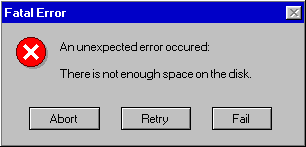
Kim gave his standard "out of disk space" speech - too many games, too much downloaded music, etc - but his cousin assured him that he only used the computer for email, documents, and photographs, and that he had already deleted whatever games were installed. Kim figured it’d have to be something else, and stopped by for some on-site support.
When he sat in front of his cousin's computer, the C-drive seemed fine. 40 out of 120 gigabytes free. But eighty gigabytes did seem like an awful lot for a casual user, so Kim started digging around.
After looking through various folders, Kim eventually ended up in C:\Documents and Settings\username\Local settings\temp\. Apparently, some temporary directory. He immediately identified a single, 75GB file named LSBurnWatcher.log. Since Notepad - or really, any other text editor - couldn't open such a file, Kim deleted it.
Simple enough, problem solved! But just to be sure, Kim restarted the computer and peeked in the temp folder again. LSBurnWatcher.log returned and weighed in at a kilobyte. He loaded it up in Notepad.
2007-08-25 10:43:43.078: --> Starting...
2007-08-25 10:43:43.265: Found 1 printer.
2007-08-25 10:43:43.265: IsLightScribePresent(): LightScribe is present!
2007-08-25 10:43:43.265: Starting WaitForDirChange() ...
Figuring it was some sort of startup log, Kim restarted the computer again. The file's size doubled.
2007-08-25 10:43:43.078: --> Starting...
2007-08-25 10:43:43.265: Found 1 printer.
2007-08-25 10:43:43.265: IsLightScribePresent(): LightScribe is present!
2007-08-25 10:43:43.265: Starting WaitForDirChange() ...
2007-08-25 10:43:43.078: --> Starting...
2007-08-25 10:43:43.265: Found 1 printer.
2007-08-25 10:43:43.265: IsLightScribePresent(): LightScribe is present!
2007-08-25 10:43:43.265: Starting WaitForDirChange() ...
And just like he figured before, problem solved! Obviously, some programmer decided to log every startup, and neglected to delete the log file. Add that to a year or two of rebooting, and one gets a crippilingly-gigantic log file.
But just as Kim was about to leave, he realized something. It would take nearly three hundred and fifty nine million reboots for the file to grow so large. For those keeping score, that's one reboot a minute for nearly seven centuries.
Kim logged back on to the computer and waited. Sure enough, five minutes after starting up, the log file started ballooning at a rate of a few hundred kilobytes per second. By the time Kim loaded it up in notepad, it was 24MB, and looked like this:
2007-08-25 10:43:43.078: --> Starting...
2007-08-25 10:43:43.265: Found 1 printer.
2007-08-25 10:43:43.265: IsLightScribePresent(): LightScribe is present!
2007-08-25 10:43:43.265: Starting WaitForDirChange() ...
2007-08-25 10:45:31.343: --> Starting...
2007-08-25 10:45:35.171: Found 1 printer.
2007-08-25 10:45:35.187: IsLightScribePresent(): LightScribe is present!
2007-08-25 10:45:35.203: Starting WaitForDirChange() ...
2007-08-25 10:49:42.796: Finished waiting after 247 seconds.
2007-08-25 10:49:42.796: Didn't find iTunes dir.
2007-08-25 10:49:42.796: Starting WaitForDirChange() ...
2007-08-25 10:49:42.796: Finished waiting after 0 seconds.
2007-08-25 10:49:42.796: Didn't find iTunes dir.
2007-08-25 10:49:42.796: Starting WaitForDirChange() ...
2007-08-25 10:49:42.796: Finished waiting after 0 seconds.
2007-08-25 10:49:42.796: Didn't find iTunes dir.
2007-08-25 10:49:42.796: Starting WaitForDirChange() ...
2007-08-25 10:49:42.796: Finished waiting after 0 seconds.
2007-08-25 10:49:42.796: Didn't find iTunes dir.
2007-08-25 10:49:42.796: Starting WaitForDirChange() ...
2007-08-25 10:49:42.796: Finished waiting after 0 seconds.
2007-08-25 10:49:42.796: Didn't find iTunes dir.
2007-08-25 10:49:42.796: Starting WaitForDirChange() ...
Those last three lines were repeated a good 10,000 times or so. Not sure what else to do, Kim threw together a simple batch file that deleted the log file on start up. Finally, problem solved!
 [Advertisement]
BuildMaster allows you to create a self-service release management platform that allows different teams to manage their applications. Explore how!
[Advertisement]
BuildMaster allows you to create a self-service release management platform that allows different teams to manage their applications. Explore how!